Desert Cleaner Wiki
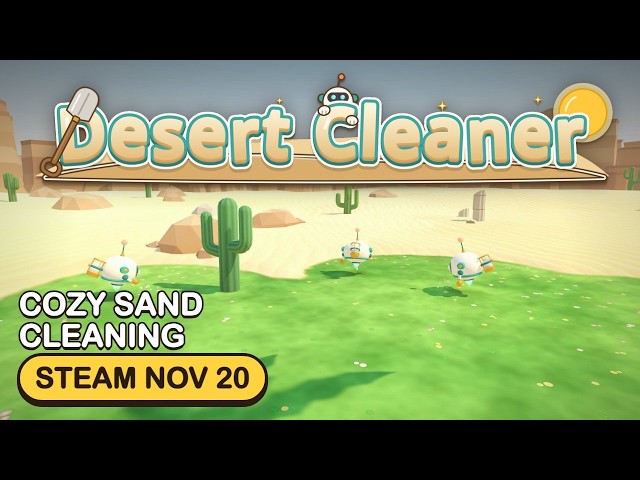
Clean buried desert sand, turn it into gold, unlock powerful tools, restore a hidden oasis, repair robots, find treasure and play online with up to 3 friends.
Complete Desert Cleaner Resource Hub
Eight quick-jump sections covering everything from your first scoop of sand to achievements and system requirements.
Latest Updates
Discover the newest guides, tips, and content
Desert Cleaner system requirements: Platform Setup Guide
Check Desert Cleaner system requirements, supported platforms, storage, memory, controller guidance, and online co-op setup tips for 2026.
Desert Cleaner clean vehicles: Gameplay Tips & Guide
Searching for Desert Cleaner clean vehicles? Learn what the game actually cleans, how to process sand, upgrade tools, restore the oasis, and play co-op.
Desert Cleaner free roam: Route Tips & Co-op Setup
Learn how to manage free-roam cleaning routes, upgrades, robots, treasure searches, and co-op roles in Desert Cleaner.
Desert Cleaner equipment: Tool Tiers & Upgrade Tips
Compare Desert Cleaner equipment, tool progression, backpack upgrades, movement boosts, portals, robots, and efficient cleaning strategies.
Desert Cleaner best equipment: Tool Tier List & Tips
Compare the best Desert Cleaner equipment, tool upgrades, backpacks, movement boosts, portals, and robots for faster oasis restoration.
Desert Cleaner save game: Backup & Recovery Guide
Learn how to protect, verify, and troubleshoot your Desert Cleaner save game across Steam-supported desktop platforms.
Desert Cleaner equipment upgrades: Tier List & Route Tips
Compare Desert Cleaner equipment upgrades, tool progression, backpack priorities, movement boosts, portals, robots, and efficient oasis-cleaning routes.
Desert Cleaner controls: Setup Guide, Tips & Tricks
Learn how to configure Desert Cleaner controls, manage movement and cleaning actions, coordinate co-op inputs, and troubleshoot common setup issues.
Desert Cleaner 100 percent completion: Route, Tips
Use this Desert Cleaner 100 percent completion guide to finish upgrades, tools, oasis restoration, treasures, robots, co-op goals, and achievements.
Desert Cleaner best way to clean: Step-by-Step Tips
Find the best way to clean in Desert Cleaner with efficient routes, backpack management, upgrade priorities, robot support, and co-op strategies.
Desert Cleaner secret locations: Treasure Route Tips
Find hidden treasure and gems in Desert Cleaner with practical search routes, oasis sweep patterns, and secret-location tips for thorough exploration.
Desert Cleaner objectives: Step-by-Step Goal Guide
Track Desert Cleaner objectives with a practical roadmap for cleaning routes, upgrades, oasis restoration, treasure hunts, co-op runs, and achievements.
Desert Cleaner Beginner Guide
Learn the basic resource loop, manage your backpack, and restore the oasis faster with a clear early-game routine.
Start Cleaning the Desert Efficiently
Desert Cleaner revolves around collecting sand, converting it into gold, and reinvesting that gold into stronger equipment and useful upgrades. A good opening route focuses on short collection trips, controlled backpack usage, and upgrades that improve the amount of sand you can gather and process over time.
Scoop Sand Into Your Backpack
Use your current cleaning tool to collect sand from the desert and fill your backpack. Begin with nearby patches so that your first trips remain short and efficient.
Opening Tips
- Start close to the return or processing area.
- Avoid crossing large empty areas during the opening minutes.
- Watch the backpack before it reaches capacity.
Convert Sand Into Gold
Return with the collected sand and convert it into gold. Gold is the main resource used to improve your tools, backpack, movement, and other support systems.
Conversion Tips
- Make a return trip before losing time to a full backpack.
- Treat every completed load as progress toward the next upgrade.
- Prioritize upgrades that increase the amount you can collect or process.
Buy High-Value Early Upgrades
Spend early gold on improvements that shorten the collection loop. Backpack capacity and cleaning speed are especially valuable because they reduce the number of return trips needed.
Upgrade Priority
- Cleaning tool performance
- Backpack capacity
- Sprint or movement improvements
- Stamina improvements
- Utility upgrades such as lucky scoop, portal, or robot support
Use Efficient Cleaning Routes
Work in compact zones instead of moving randomly across the map. Clear one nearby area, return to process the load, and then expand toward the next section.
Route Rules
- Choose a route with minimal empty walking distance.
- Finish dense sand clusters before moving farther away.
- Use sprint and stamina upgrades for longer routes.
- Reserve portals or robot support for areas where they save repeated travel.
Restore the Oasis Consistently
The fastest restoration progress comes from maintaining a steady cycle of collecting, converting, upgrading, and returning to the next dense area. Avoid spending all gold on convenience upgrades before improving your main cleaning output.
Restoration Checklist
- Keep collecting rather than waiting between trips.
- Upgrade whenever the purchase noticeably improves the loop.
- Coordinate roles in co-op instead of duplicating the same route.
- Use the strongest available tool on the densest remaining sand.
Desert Cleaner Tools Tier List
Compare the cleaning-tool progression from the Cotton Glove to the Full Sandstorm, then choose support upgrades that match your route and playstyle.
Rank Cleaning Tools and Support Upgrades
The cleaning-tool progression is best judged by collection speed, efficiency, upgrade value, and the situations where each tool performs well. Early tools are useful for establishing the economy, while later tools are designed to accelerate large-scale desert clearing. Support upgrades such as backpack, sprint, stamina, lucky scoop, portal, and robot improvements affect the entire collection loop.
Full Sandstorm
- Highest-end tool in the listed progression
- Best suited to large-scale clearing
- Strongest long-term value once the economy supports it
Best for: Late-game restoration and fast clearing of large remaining areas
Upper-Tier Cleaning Tools
- Strong improvement over the starting equipment
- Good balance between speed and upgrade cost
- Useful for expanding routes beyond the starting area
Best for: Mid-to-late progression and efficient solo routes
Intermediate Cleaning Tools
- Reliable stepping stones toward the strongest tools
- Helpful for building early gold income
- Effective when paired with backpack and movement upgrades
Best for: Early progression and compact cleaning routes
Cotton Glove
- Starting point of the cleaning-tool progression
- Useful for learning the collection and conversion loop
- Low-cost entry into desert restoration
Best for: Opening trips and learning the basic gameplay cycle
Backpack Upgrade
A larger backpack reduces return trips and increases the value of every route.
Sprint and Stamina Upgrades
Movement and endurance upgrades improve long routes and reduce downtime between collection zones.
Portal Upgrade
A portal is especially useful when the best remaining sand is far from the normal return path.
Lucky Scoop and Robot Upgrades
These upgrades are more valuable after the main cleaning and backpack loop is already efficient.
Desert Cleaner Codes and Launch Bonuses
Check official announcements for redeemable rewards and avoid unrelated codes from other games or platforms.
Official Rewards, Clearly Explained
There are no official redeem codes listed in the available Desert Cleaner information right now. This section separates official developer announcements from community claims and excludes fake Roblox codes, unrelated mobile-game codes, and rewards that are not tied to Desert Cleaner.
Active Redeem Codes
No official Desert Cleaner redeem code is listed in the available official game information right now.
Next: New codes appear here as soon as the developer announces them on official Steam channels.
Launch Bonuses
No specific launch bonus code or guaranteed launch reward is listed in the available official game information.
Next: Treat launch-reward claims as official only when the developer announces them.
What Counts as an Official Reward
Only rewards directly announced for Desert Cleaner by the developer or through the game's official Steam channels count as official.
Not eligible
Desert Cleaner Co-op Guide
Use Steam invites and coordinated routes to make four-player restoration runs faster and more organized.
Clean the Desert Together
Desert Cleaner supports online co-op for up to four players. A coordinated team can divide collection areas, reduce overlapping movement, and maintain a steady flow of sand conversion and upgrades. Shared gold and upgrades make team-wide spending decisions especially important.
Create or Join a Steam Session
Start an online session and invite friends through Steam. Confirm that every player has joined before assigning routes and roles.
Session Tips
- Use Steam's invite functions to bring teammates into the session.
- Agree on a starting route before everyone begins collecting.
- Keep communication focused on route progress and upgrade priorities.
Assign Practical Team Roles
Divide responsibilities so that players cover different areas instead of repeatedly cleaning the same patch of sand.
Front Cleaner
Moves ahead and clears the densest nearby sand.
Route Cleaner
Works beside the front player and completes adjacent patches.
Return Runner
Maintains the collection-to-conversion rhythm and reports when the team should regroup.
Utility Specialist
Uses movement, portal, lucky scoop, or robot upgrades where they produce the greatest team benefit.
Coordinate Shared Gold and Upgrades
Because gold and upgrades are shared team resources, prioritize improvements that benefit the whole group rather than duplicating minor conveniences.
Shared Upgrade Priority
- Improve the main cleaning output
- Increase backpack capacity
- Improve sprint and stamina for longer routes
- Use portal utility for distant areas
- Add lucky scoop or robot support when the core loop is efficient
Run Parallel Cleaning Routes
Split the desert into clear sections and assign each player a direction. Parallel routes reduce overlap and make it easier to identify which areas still need work.
Parallel Route Rules
- Avoid four players following one person unless a dense area requires it.
- Leave a clear return path for players carrying full backpacks.
- Call out untouched zones before moving deeper into the desert.
- Regroup when the team needs to make a shared upgrade decision.
Handle Drop-In Players Efficiently
When a player joins an ongoing run, assign them to an unclaimed nearby section or a support role instead of sending them into an already cleared route.
Drop-In Advice
- Give the new player a quick route summary.
- Point them toward the nearest dense sand area.
- Explain the current shared upgrade priority.
- Use the new player to open a parallel route or support long-distance collection.
Optimize Timed Runs
For time-sensitive objectives, reduce idle movement and make upgrade decisions before the team splits again. The strongest runs maintain continuous collection while one or more players keep the conversion cycle moving.
Timed Run Strategy
- Start with nearby dense sand for immediate progress.
- Split routes as soon as the opening area is covered.
- Use sprint and stamina improvements to reduce travel downtime.
- Reserve portal and robot utility for the most time-consuming sections.
- Regroup only when coordination produces more value than continued parallel cleaning.
Desert Cleaner Robots Guide
Robots reduce the amount of manual digging required and help maintain a faster cleaning rhythm across the oasis.
Repair, Purchase, and Deploy Cleaning Robots
Use manual cleaning to establish your early progress, then invest in automation when robot assistance can meaningfully reduce repeated digging. Repair broken units before replacing them, compare the cost of a new robot with the value of faster cleanup, and use automated digging to keep progress moving while you explore.
Repair Broken Robots
Restore damaged robots before abandoning them. A repaired robot can return to automated digging and may be a more efficient investment than immediately purchasing a replacement.
Tip: Check repair options whenever a robot stops contributing to cleanup.
Purchase New Robots
Buy additional robots when manual cleaning becomes the main limit on progress. New units are most useful after the player has established a reliable cleanup route and can keep them working consistently.
Tip: Prioritize robot purchases when the cost is supported by steady cleaning progress.
Use Automated Digging
Assign robots to automated digging so cleanup can continue with less direct input. Automation is especially useful for repetitive areas that have already been identified and partially cleared.
Tip: Use robots on predictable work zones while manually investigating unexplored areas.
Manual cleaning provides direct control and is useful for exploration, while robot-assisted cleaning improves efficiency through parallel work. The strongest approach combines both methods instead of relying exclusively on either one.
Tip: Explore manually, then deploy robots to repeat and maintain the cleared route.
Desert Cleaner Treasure and Gems Guide
Treasure chests and gems reward thorough exploration and can extend upgrades beyond the normal limits offered by the shop.
Find Treasure, Collect Gems, and Uncover the Oasis
Do not treat the visible cleanup route as the entire objective. Search around cleared spaces, investigate areas that appear incomplete, and track discovered locations so that treasure and gems are not missed. Hidden discoveries can provide upgrade progress beyond ordinary shop boundaries, making full exploration valuable even after the main route is clean.
Treasure chests are hidden discoveries found through exploration. Search beyond the most obvious cleaning path and revisit partially cleared areas when a section appears to contain more than its visible rewards.
Search tip: Check edges, corners, isolated spaces, and areas revealed after nearby debris has been removed.
Gems
Gems are exploration rewards connected to uncovering the oasis. Collecting them contributes to upgrade potential and can push progression beyond normal shop limits.
Search tip: Treat every gem as a reason to inspect the surrounding area for additional hidden discoveries.
Sweep the oasis in consistent sections instead of moving randomly. Clear one area, inspect its perimeter, record any reward found, and then move to the next adjacent section.
Search tip: Use a row-by-row or spiral-style route to reduce missed spaces and unnecessary backtracking.
For a complete run, clear the main route, inspect all revealed side areas, collect every visible gem, search around isolated objects, revisit incomplete sections, and confirm that no unexplored pocket remains.
Search tip: Use the checklist after the main cleanup is finished so exploration is not interrupted by routine digging.
Desert Cleaner Achievements Guide
Organize achievement hunting by progression, exploration, timed completion, co-op, and New Game Plus objectives.
Achievement Roadmap for Every Type of Run
Achievement progress is easiest to manage when objectives are grouped by the type of run they require. Complete ordinary progression first, then use dedicated exploration, timed, co-op, and New Game Plus attempts to clean up the remaining objectives.
| Category | Objective Type | Unlock Condition | Recommended Approach | Player Requirement |
|---|---|---|---|---|
| Progression | Normal progression achievements | Advance through the game's standard cleaning and upgrade progression. | Complete naturally during the first serious playthrough. | Solo-friendly |
| Exploration | Treasure and oasis discovery achievements | Find hidden discoveries and work toward fully uncovering the oasis. | Use a systematic search pattern and revisit areas after clearing nearby debris. | Solo-friendly |
| Timed Runs | Time-limited completion achievements | Complete the relevant cleaning objective within its required time limit. | Practice the route first, then combine efficient movement with robot-assisted progress. | Optimized run recommended |
| Co-op | Online cooperative achievements | Complete the relevant objective while playing online co-op. | Assign players separate cleaning and exploration responsibilities to avoid duplicated work. | May require multiple players |
| New Game Plus | New Game Plus achievements | Complete the specified New Game Plus progression or challenge objective. | Carry forward efficient upgrade and route knowledge from the first playthrough. | Optimized run recommended |
Desert Cleaner System Requirements
Compare supported desktop platforms, hardware guidance, controller support, storage, and online co-op requirements.
Platform and System Requirements
Use the Steam store listing as the platform reference for current minimum and recommended specifications. Before purchasing or joining online co-op, confirm the operating-system version, available storage, memory, graphics capability, controller compatibility, and broadband connection on the target device.
| Platform | Minimum Requirements | Recommended | Storage & Connectivity | Controllers & Platform Notes |
|---|---|---|---|---|
| Windows | See the current Windows minimum requirements on the Steam store listing. | See the current Windows recommended requirements on the Steam store listing. | Use the storage and memory values shown in the Steam system requirements section. | Check the Steam listing for the current controller support information. |
| macOS | See the current macOS minimum requirements on the Steam store listing. | See the current macOS recommended requirements on the Steam store listing. | Use the storage and memory values shown in the Steam system requirements section. | Check the Steam listing for the supported Apple Silicon Mac models or compatibility details. |
| SteamOS and Linux | See the current SteamOS and Linux minimum requirements on the Steam store listing. | See the current SteamOS and Linux recommended requirements on the Steam store listing. | Use the storage and memory values shown in the Steam system requirements section. | Check the Steam listing for the current controller support information. |
| Online Co-op | A supported game platform and an installation that meets the listed system requirements. | Use the recommended platform specifications for smoother cooperative play. | Broadband internet is required for online co-op. | Confirm controller support and player-input compatibility before starting a cooperative session. |